
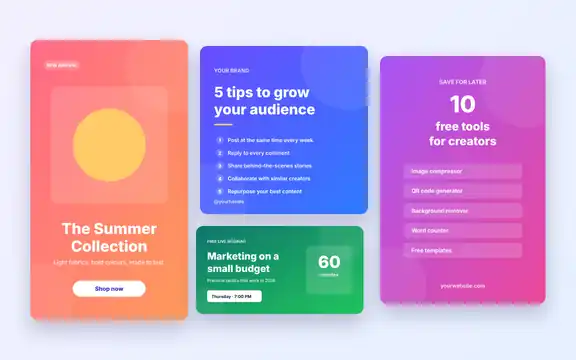
Download free (ZIP, 5.2 KB)
No sign-up required. Free for personal and commercial use.
- Category
- Social Media Resources
- Format
- SVG vector files (ZIP)
- File size
- 5.2 KB
- Works with
- Figma, Canva, Inkscape, Illustrator, Affinity
- License
- MIT (commercial use allowed)
- Last updated
- November 2026
What’s in the kit
| File | Size (pixels) | Use it for |
|---|---|---|
| instagram-post-1080×1080.svg | 1080 × 1080 | Instagram feed posts (square) |
| instagram-story-1080×1920.svg | 1080 × 1920 | Instagram and Facebook Stories, Reels covers, TikTok |
| facebook-post-1200×630.svg | 1200 × 630 | Facebook link posts and Open Graph images |
| linkedin-post-1200×627.svg | 1200 × 627 | LinkedIn shared links and posts |
| pinterest-pin-1000×1500.svg | 1000 × 1500 | Pinterest standard pins (2:3) |
The ZIP also includes a README with editing steps and the license file.
How to edit the designs
- Download and unzip the kit.
- Open an SVG in Figma (drag it onto the canvas), Canva (upload it), Inkscape or Illustrator.
- Click any text to change it, and swap the gradient colours for your brand colours.
- Add your logo or a product photo if you like.
- Export as PNG or JPG at the original size, then post it.
Fonts: the designs use the free Inter font with Arial as a fallback. Install Inter from Google Fonts for the intended look. To shrink exported images before posting, use our Image Compressor; to adapt a design to another size, try the Image Resizer.
Who is it for?
- Small businesses announcing offers, events and new products.
- Bloggers promoting new articles across several networks.
- Social media managers who want a consistent look across platforms.
Frequently asked questions
Can I edit SVG files in Canva?
Yes. Canva lets you upload SVG files; text may be converted to editable elements depending on your plan. For full control over every text layer, use Figma or Inkscape, which are free.
Why are the files so small?
SVG files describe shapes and text as code instead of storing pixels, so they are tiny and stay sharp at any size. You export a PNG only when you are ready to post.
Can I use these for client work?
Yes. The MIT license allows personal and commercial use, including designs you create for clients.
Related templates
Email Newsletter Template
Responsive HTML email.
Pitch Deck TemplateMatching slide design for PowerPoint.
YouTube Thumbnail DownloaderGrab thumbnails in every size.