
No sign-up required. Free for personal and commercial use.
- Category
- Business Templates
- Format
- PowerPoint (.pptx), 16:9
- File size
- 17.9 KB
- Works with
- PowerPoint, Google Slides, Keynote, LibreOffice
- License
- Free for personal and commercial use
- Last updated
- November 2026
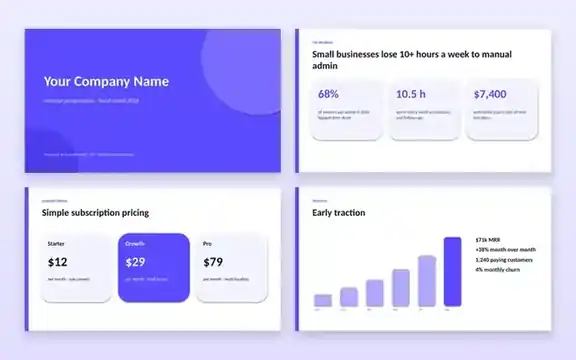
The 8 slides
- Cover: company name, one-line pitch and presenter details.
- The problem: the pain your customers feel, backed by a key statistic.
- Our solution: what your product does and why it is better.
- Market opportunity: total, serviceable and obtainable market sizes.
- Business model: pricing plans and how you make money.
- Traction: users, revenue and growth milestones.
- The team: founders and key people with short bios.
- Closing: your ask, use of funds and contact details.
Every element is a native shape or text box, so you can edit colours, fonts and numbers without special software.
How to use this template
- Download the .pptx file and open it in PowerPoint, Keynote or LibreOffice Impress, or upload it to Google Drive and open it with Google Slides.
- Replace the sample company name and text on each slide.
- Update the market and traction numbers with your real data.
- Change the accent colour to match your brand: select a shape, then pick a new fill colour.
- Add your logo and team photos. Use our Background Remover for clean headshots.
- Export to PDF when sending the deck by email.
Who is it for?
- Startup founders preparing for investors, accelerators or competitions.
- Students presenting a business plan or class project.
- Small businesses pitching to partners, banks or grant committees.
Frequently asked questions
Can I open it in Google Slides?
Yes. Upload the .pptx to Google Drive, right-click it and choose Open with → Google Slides. You can also save a Google Slides copy to edit online.
Can I add more slides?
Yes. Duplicate any slide to keep the same design, then change the content. Common additions are a competition slide and a financial projections slide.
What size are the slides?
The deck is widescreen 16:9, the default for modern projectors, laptops and video calls.
Do I need to credit Tolket?
No credit is required. You are free to use and modify the deck for personal and commercial presentations.
Related templates
A matching website for your product.
Invoice TemplateBill your first customers.
Social Media Post KitAnnounce your launch.
Related categories
Business TemplatesGraphic Design TemplatesEducation Resources