
No sign-up and no email required. Free for personal and commercial use.
- Category
- Business Templates
- Format
- HTML email (ZIP)
- File size
- 3.4 KB
- Works with
- Mailchimp, Brevo, MailerLite, Klaviyo and others
- License
- MIT (commercial use allowed)
- Last updated
- November 2026
About this newsletter template
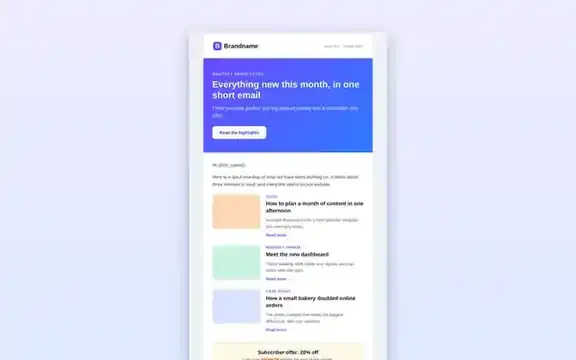
Email is not the web: Outlook ignores much of modern CSS and Gmail strips <style> blocks in some situations. That is why this template uses nested tables and inline styles instead of flexbox or grid. The result looks consistent across Gmail, Outlook, Apple Mail and mobile apps while still feeling modern, with a coloured header, a featured story and tidy article cards.
Sections included
- Preheader text that appears next to the subject line in the inbox.
- Brand header with your logo or name.
- Hero story with headline, intro and a bulletproof call-to-action button.
- Article blocks with a category label, title, summary and “Read more” link.
- Footer with address, preferences and unsubscribe links.
How to use this template
- Download and unzip the file, then open
index.htmlin a browser to preview it. - Edit the text, links and colours directly in the HTML.
- Copy the whole file into your email platform’s “custom HTML” or “code your own” editor.
- Replace
{{first_name}},{{unsubscribe_url}}and{{preferences_url}}with your platform’s merge tags. - Send test emails to Gmail, Outlook and Apple Mail before sending the campaign.
Email best practices
- Keep the most important message and button in the top 400 pixels.
- Write descriptive link text instead of “click here”.
- Always include a working unsubscribe link and your postal address; laws such as CAN-SPAM and GDPR require it.
- Add alt text to every image, because many clients block images by default.
Frequently asked questions
Does it work in Outlook?
Yes. The layout uses tables and inline styles, which classic Outlook for Windows renders reliably. Rounded corners may appear square in Outlook, which is normal.
Can I use it with Mailchimp?
Yes. Create a campaign, choose “Code your own”, paste the HTML and replace the merge tags with Mailchimp’s, such as *|FNAME|* and *|UNSUB|*.
How do I add images?
Upload images to your email platform or website and paste their full URLs into the src attributes. Always set width and alt attributes.
Related templates
Editable posts for five platforms.
Launchpad Landing PageCollect sign-ups for your newsletter.
Invoice TemplateExcel invoice with automatic totals.