
No sign-up required. Free for personal and commercial use.
- Category
- Business Templates
- Format
- Excel workbook (.xlsx)
- File size
- 6.1 KB
- Works with
- Excel, Google Sheets, LibreOffice, Numbers
- License
- Free for personal and commercial use
- Last updated
- November 2026
About this invoice template
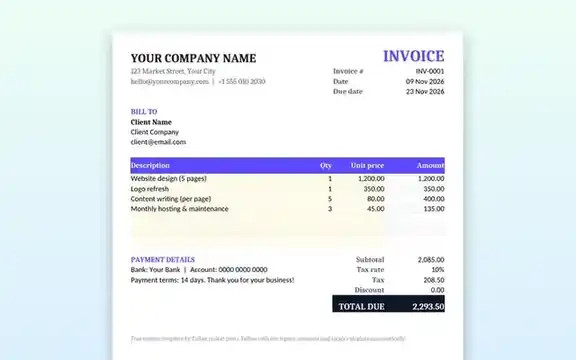
A clear invoice helps you get paid faster. This template puts the information clients look for in the expected places: your business details at the top, the invoice number and due date on the right, the client’s details under “Bill to”, an itemised table and a highlighted total. It is set to print neatly on a single A4 or Letter page.
Features
- Automatic Amount = Quantity × Unit price for every line.
- Subtotal, adjustable tax rate, discount and total due calculated for you.
- Invoice number, today’s date filled in automatically and a due date set 14 days later (both editable).
- Payment details area for bank, PayPal or other instructions.
- Prices shown with two decimals; add your currency symbol in one step.
- Print area pre-set for a tidy PDF export.
How to use this template
- Download the .xlsx file and open it in Excel, or upload it to Google Drive and open it with Google Sheets.
- Replace “Your Company Name”, your address and contact details once, then save a master copy.
- For each new invoice, update the invoice number and client details. The date cell shows today’s date automatically; type the real invoice date over it (Ctrl+; in Excel) so it stays fixed when you reopen the file.
- Enter each product or service with its quantity and unit price; only edit the white cells.
- Set your tax rate and any discount.
- Export or print to PDF and send it to your client.
What to include on every invoice
- A unique invoice number and the issue date.
- Your business name, address and tax or registration number if you have one.
- The client’s name and address.
- A clear description of each item, with quantity, price and line total.
- Payment terms, due date and how to pay.
Guide: want to understand or change the formulas? Read how to make an invoice in Excel, step by step.
Frequently asked questions
Will the formulas work in Google Sheets?
Yes. The template uses standard formulas that work the same way in Excel, Google Sheets, LibreOffice Calc and Apple Numbers.
How do I change the currency?
Select the price and amount cells, open Format Cells (or Format → Number in Google Sheets) and choose your currency.
Can I add more line items?
Yes. Insert new rows inside the item table and copy the formula from the Amount cell above; the subtotal includes rows added inside the table.
Is this template legally valid?
It contains the information most invoices need, but requirements vary by country. Check your local tax rules, for example whether you must show a VAT or GST number.
Related templates
ATS-friendly Word resume.
Pitch Deck Template8-slide PowerPoint deck.
Weekly PlannerExcel schedule and task tracker.