
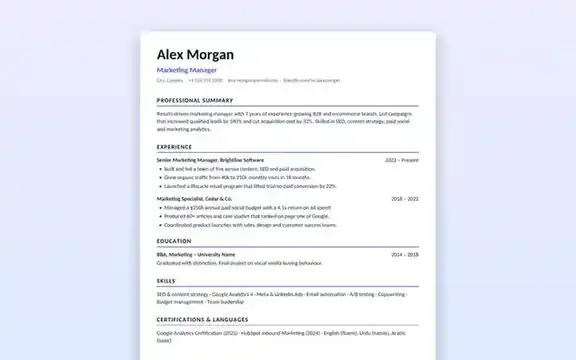
No sign-up required. Opens in Microsoft Word, Google Docs, LibreOffice and Pages.
- Category
- Business & Education Templates
- Format
- Word document (.docx)
- File size
- 3.3 KB
- Works with
- Word, Google Docs, LibreOffice, Pages
- License
- Free for personal and commercial use
- Last updated
- November 2026
Why this resume works
Many good candidates are filtered out by software before a person reads their resume. Text boxes, tables, icons and two-column layouts can confuse applicant tracking systems (ATS). This template uses real Word headings and a single column, so your name, job titles, dates and skills are read correctly, while clean typography keeps it pleasant for human reviewers.
Sections included
- Header with your name, target role and contact line.
- Professional summary of three to four lines.
- Experience with job title, company, dates and achievement bullets.
- Education.
- Skills.
- Certifications and languages.
How to use this template
- Download the file and open it in Word, or upload it to Google Drive and open it with Google Docs.
- Replace the sample name, title and contact details.
- Write a summary tailored to the job you are applying for.
- List your experience in reverse order, starting each bullet with an action verb and a measurable result.
- Keep it to one page if you have less than ten years of experience.
- Save as PDF unless the employer asks for a Word file, and name it Firstname-Lastname-Resume.pdf.
Writing tips that get interviews
- Mirror important keywords from the job description, honestly.
- Prefer numbers: “cut response time by 30%” beats “improved customer service”.
- Remove photos, date of birth and full address unless they are expected in your country.
- Use one font and consistent date formats throughout.
Guide: learn the formatting rules and keyword tips that help this template pass applicant tracking systems in how to write an ATS-friendly resume.
Frequently asked questions
Is this resume template really ATS friendly?
Yes. It uses a single column, standard headings and no text boxes or images, which is the format applicant tracking systems parse most reliably.
Can I edit it in Google Docs?
Yes. Upload the .docx to Google Drive and open it with Google Docs. Formatting is preserved.
Should I send the resume as Word or PDF?
PDF keeps your formatting identical on every device, so it is usually the safer choice. Send Word only if the application asks for it.
Can I add a second page?
Yes. Simply keep typing; the headings and styles continue on the next page.
Related templates
Plan classes, study blocks and deadlines.
Invoice TemplateExcel invoice for freelancers.
Pitch Deck TemplatePresent your idea in eight slides.