
Design faster with a strong starting point
A good template solves the hard decisions for you: layout, hierarchy, spacing and contrast. You focus on your message. Our design templates are built with clean grids, generous white space and system-friendly fonts so they still look right when you swap in your own content.
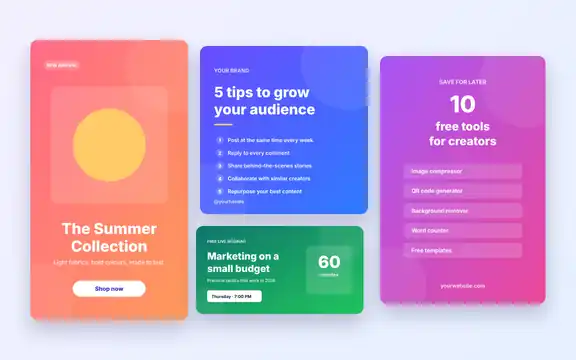
- The Social Media Post Kit contains five scalable SVG designs sized for Instagram posts and stories, Facebook, LinkedIn and Pinterest.
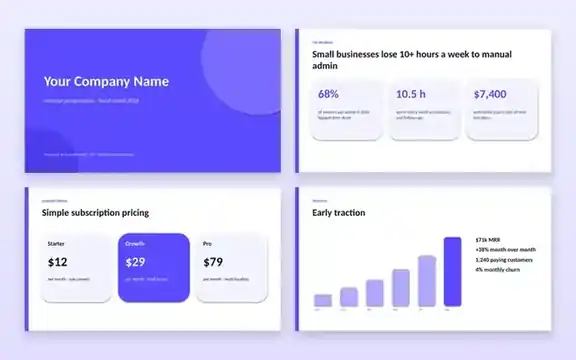
- The Pitch Deck Template is a clean eight-slide PowerPoint presentation that also opens in Google Slides and Keynote.
Five design rules that always help
- Contrast: dark text on light backgrounds (or the reverse) is easier to read on small screens.
- Hierarchy: make the single most important message the biggest thing on the canvas.
- Consistency: stick to one or two fonts and a small colour palette.
- Space: leave room around text; crowded designs look cheaper.
- Safe zones: keep key text away from edges that apps may crop or cover.
Need a cut-out photo for your design? Try the Background Remover and the Image Cropper.
Frequently asked questions
Can I edit SVG files in Canva?
Yes. Canva can import SVG files, and you can also edit them in Figma, Inkscape (free) or Adobe Illustrator.
Will the designs stay sharp when resized?
Yes. SVG is a vector format, so it scales to any size without losing quality. Export to PNG or JPG when you are ready to post.
Can I use these designs for my brand or clients?
Yes, for personal and commercial projects. Please do not resell the template files themselves.