
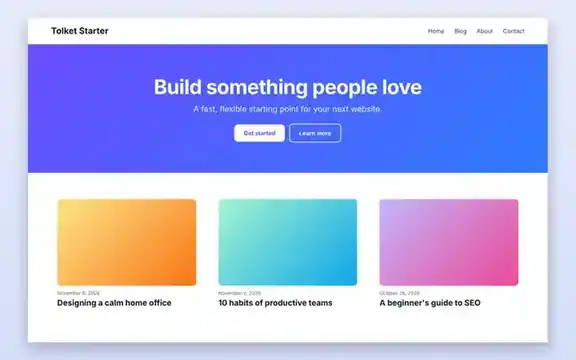
Upload the ZIP as it is in WordPress. No sign-up required. Free for personal and commercial sites.
- Category
- Website Templates
- Format
- WordPress theme (ZIP)
- File size
- 9.4 KB
- Requires
- WordPress 6.4+, PHP 7.4+
- License
- GPLv2 or later
- Last updated
- November 2026
About the theme
Tolket Starter is a block theme, which means the whole site is built from WordPress blocks instead of PHP template files. You edit the header, footer, blog layout and pages in Appearance → Editor, with no code and no paid page builder. It ships with sensible typography, a purple-to-blue accent gradient and spacing presets defined in theme.json.
What’s included
style.cssTheme header and a few base styles.theme.jsonColours, fonts, spacing and layout settings.parts/Editable header and footer.templates/Index, home, single post, page, search results and 404.patterns/Hero and features block patterns.readme.txtandLICENSE.txt
How to install it
- Download
tolket-starter.zip. Do not unzip it. - In your WordPress dashboard go to Appearance → Themes → Add New Theme → Upload Theme.
- Choose the ZIP file, click Install Now and then Activate.
- Open Appearance → Editor to customise templates, colours and fonts.
- Insert the Hero and Features patterns from the block inserter’s Patterns tab to build your home page.
Who is it for?
- Bloggers who want a quick, distraction-free site.
- Small businesses that prefer to edit their site visually.
- Developers who need a lean starter theme for client projects.
License
Like WordPress itself, Tolket Starter is licensed under the GNU General Public License v2 or later. You can use it on unlimited sites, modify it and redistribute it under the same license.
Frequently asked questions
Does it work with Elementor or other page builders?
It is designed for the native block editor, but it does not block page builders. Many builders work on top of block themes, although you get the best results using blocks.
Can I change the colours and fonts?
Yes. Go to Appearance → Editor → Styles to change the palette, typography and spacing for the whole site at once.
Will it slow my site down?
No. The theme has almost no CSS of its own and loads no JavaScript, so pages stay light.
Is it compatible with WooCommerce?
Basic WooCommerce pages work with WordPress’s default block templates, but the theme does not include custom shop styling.
Related templates
Static one-page site for businesses.
Launchpad SaaS Landing PageProduct page with pricing toggle.
Social Media Post KitPromote new blog posts on social media.